Claims settlement
A 25-agent claims process with 10 human approvals. The flagship example: the BPMN map, health, cost, ranked fixes, the security review and every report.
 Juggernaut Devopen source
TorqueSight · Process intelligence for AI agents
TorqueSight is a skill for Claude, Claude Cowork, Claude Code and OpenAI Codex. Describe the agent system you want, or point it at one you already have. It draws a BPMN map of every agent, scores each agent's health and cost from your run logs, ranks the fixes worth making, and reviews whether your agents are safe, all in one offline viewer. It is not an agent framework. It sits above whatever runs your agents and never sees your data.
That is process intelligence for AI agents: you see inside the process your agents run.
Logs tell you what one call did. TorqueSight shows you the whole process your agents run, and how every run moved through it.
Your blueprint becomes a BPMN map: every agent, decision, parallel step, retry loop, timer and human approval, in the lanes that own them.
Your run logs land on the map. Each agent gets a health and a cost score, and the As run view shows which paths real runs took and how often each loop fired.
TorqueSight ranks the fixes worth making with an estimated saving, predicts risky agents before they fail, and flags agents that could act on untrusted input without approval.
Built for n8n
Download your workflow and import it, then import n8n's own execution history. You get the BPMN map, agent health and cost, prompt changes that made an agent worse, and ranked fixes, with no changes to your workflows.
Every agent, decision, parallel split, retry loop, timer, error handler and human approval, in a viewer you can search, zoom and share links into. Exports to BPMN 2.0 for bpmn.io and Camunda.
A single offline HTML file with nine tabs: the map, the process, health, runs, cost and fixes, security, readiness, every report, and the source blueprint and prompts.
Fifteen optimizer rules find prompt regressions, retry loops, timeouts, premium models on simple jobs and reviewers that rewrite instead of patching, each with an estimated saving and a test to run first.
Before any run, a readiness score for every agent from the blueprint and a short interview, so you know which agents are shaky before they fail.
Each agent scored against the Rule of Two: untrusted input, sensitive data and the ability to act. Seven checks, no attacks, no code execution.
No server, no account, no telemetry. The recorder writes metadata only to your own logs, and you bring the logs to TorqueSight. Juggernaut Dev never receives anything.
Process intelligence, also called process mining, takes the event logs a business already produces, rebuilds the real process from them, and shows where it is slow, costly or risky. Companies have used it for years on supply chains, finance and customer service.
TorqueSight brings process intelligence to AI agents. Your blueprint and your agents' run logs become a live process map, with health, cost and safety on every step.
| Aspect | Agent observability | Process intelligence with TorqueSight |
|---|---|---|
| What you look at | One trace or one model call at a time | The whole process across every run |
| The question it answers | What happened in this call? | Where does the process break, what does it cost, and what should change? |
| What you get | Traces, logs and dashboards | A BPMN map, health and cost per agent, ranked fixes, a risk register and a security review |
| People and approvals | Usually out of view | Drawn in their own lanes, with timers and escalations |
| Starting point | A tracing SDK or proxy in your code | What you already have: n8n history, OpenTelemetry traces, Langfuse exports, or a small recorder |
TorqueSight does not replace your observability tool. It reads what that tool already collects and turns it into a process you can see, score and improve.
The TorqueSight viewer is one HTML file that opens in any browser, offline. Pick a tab to see what it shows, then open the same tab in a live demo built from a 25-agent claims process.
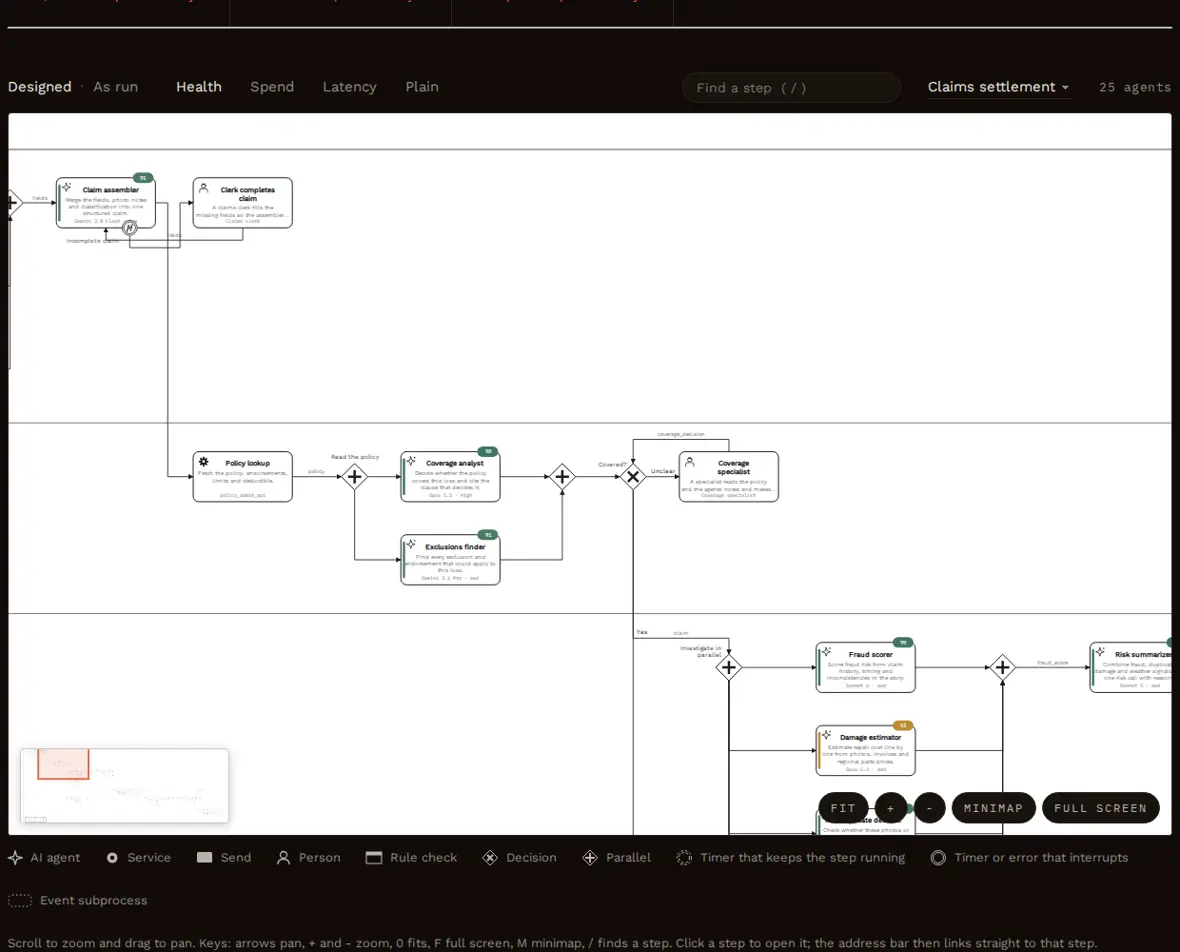
Lanes, agents with their jobs, decisions, parallel work, retry loops, timers and human approvals. Switch between Designed and As run, color the steps by health, spend or latency, search for a step, and move around a long process with the minimap, the keyboard and full screen. Clicking a step opens it and puts a link to that step in the address bar, so you can send it to a colleague.
Open the Map tab in the live demo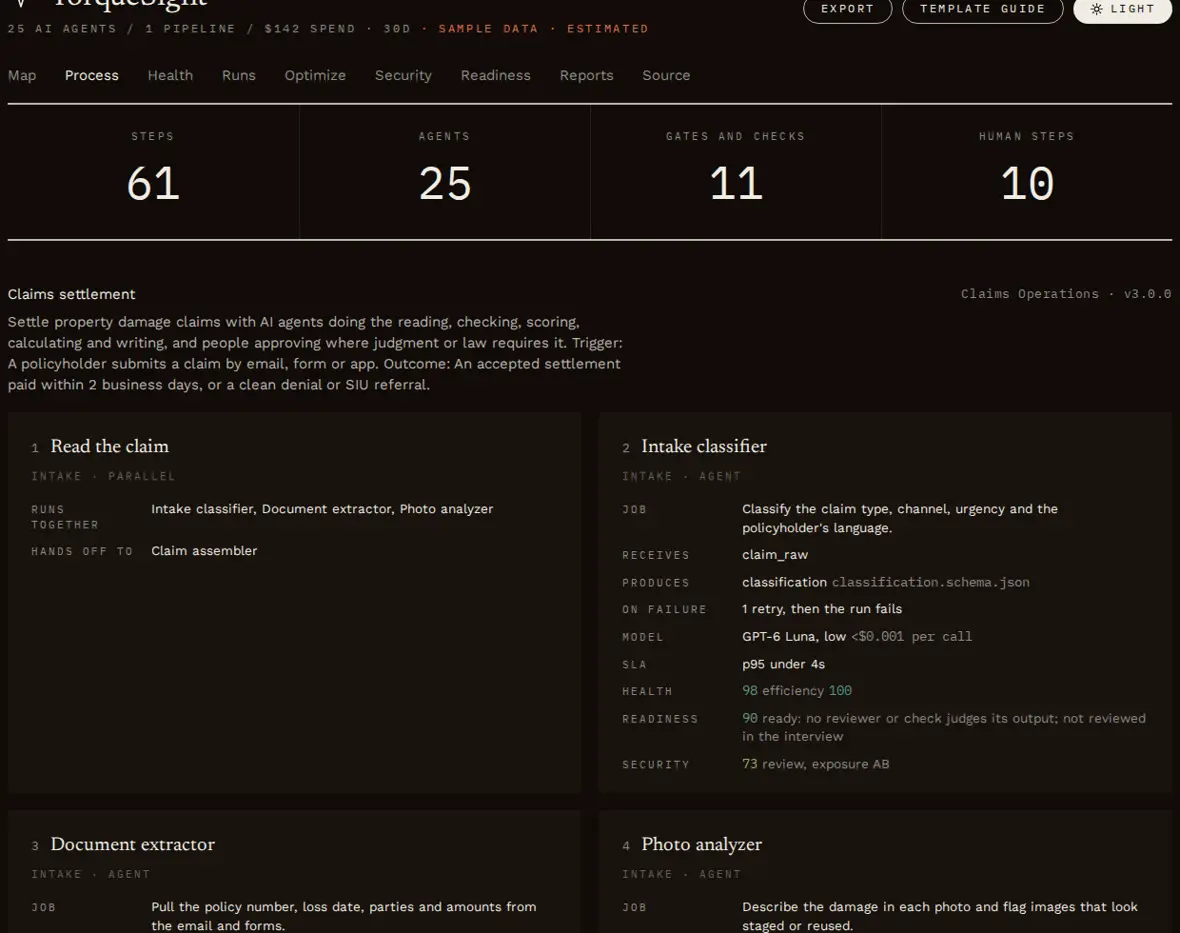
Each card shows the step's job, what it receives and from whom, the context it is given, what it produces, where it hands off, its timers and error handlers, its model and limits, and its readiness and security scores.
Open the Process tab in the live demo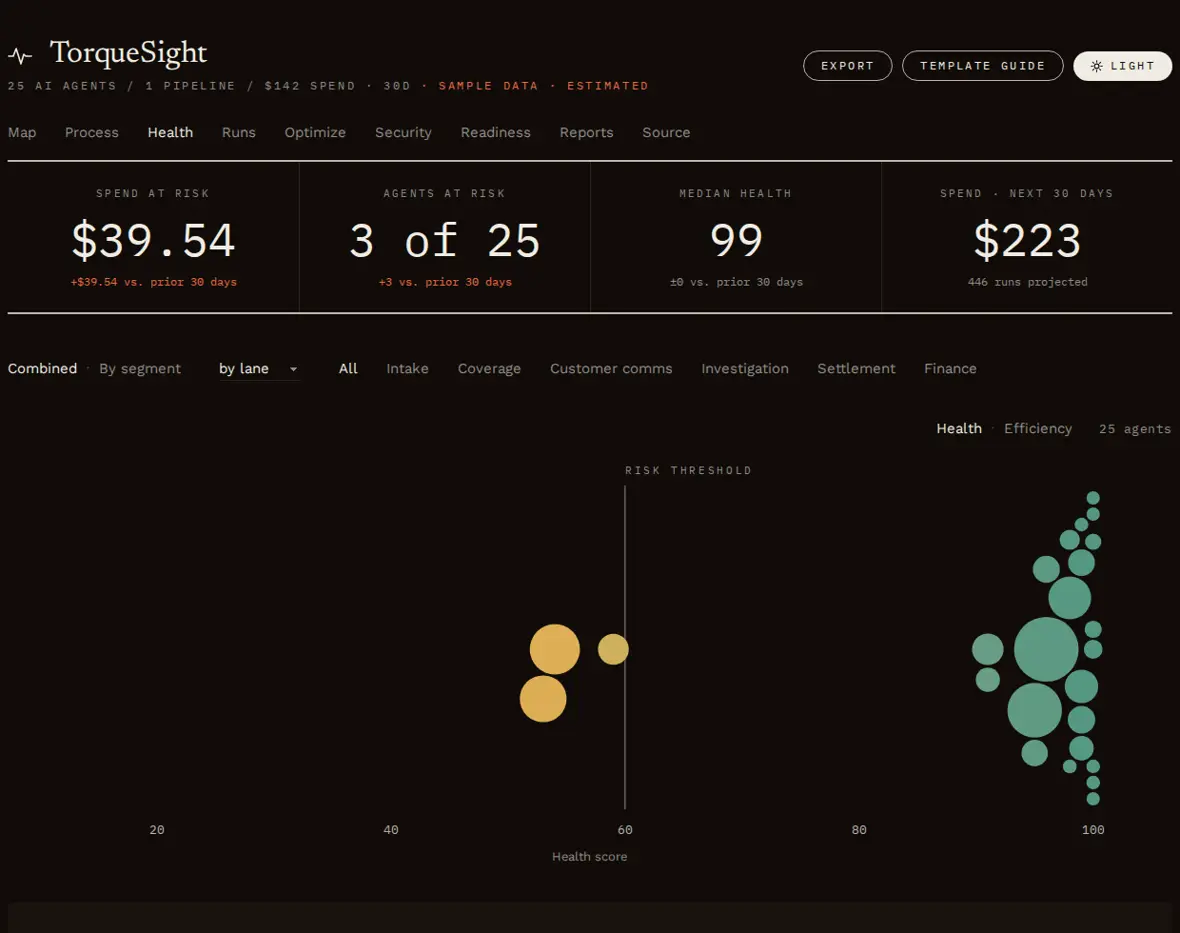
Every AI agent is a bubble placed by health score and sized by spend, with a watchlist of drift, prompt versions and budget runway. Click an agent for its 30-day trajectory and exactly what is pulling its score down.
Open the Health tab in the live demo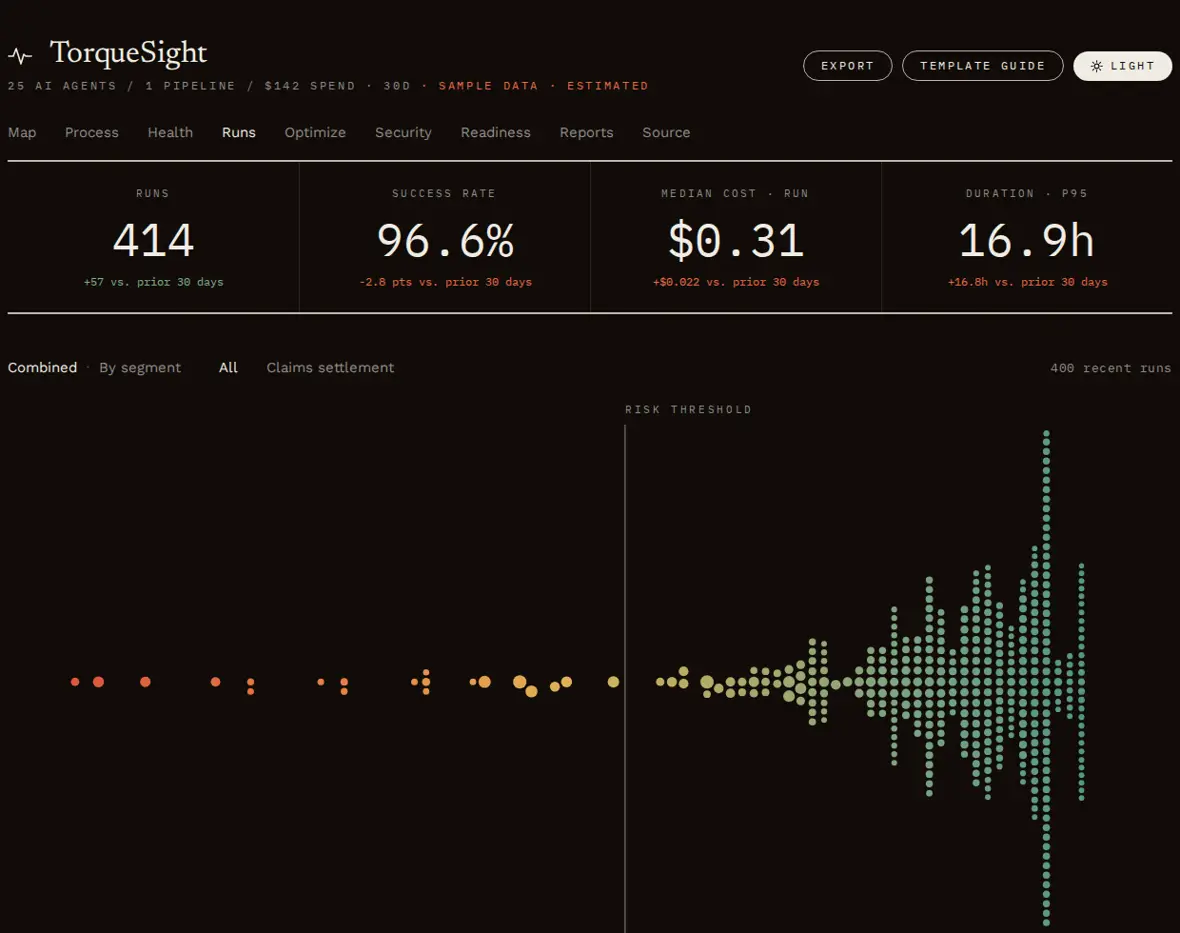
Every recent run by score and cost, the runs that failed or went over budget, and a step-by-step timeline of any run.
Open the Runs tab in the live demo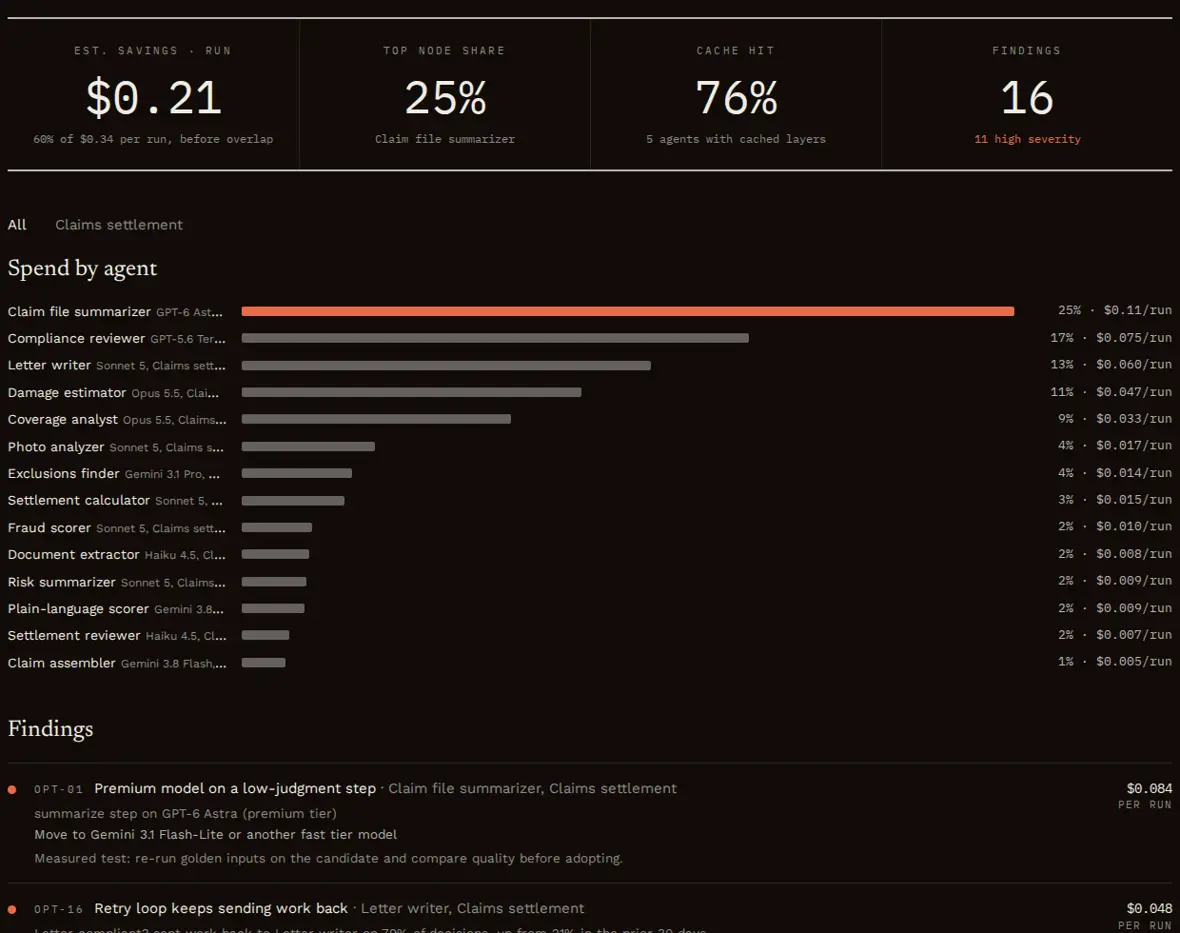
Spend by agent over 30 days, ranked fixes with their evidence and estimated savings, and a what-if table to try a cheaper model before you change anything.
Open the Optimize tab in the live demo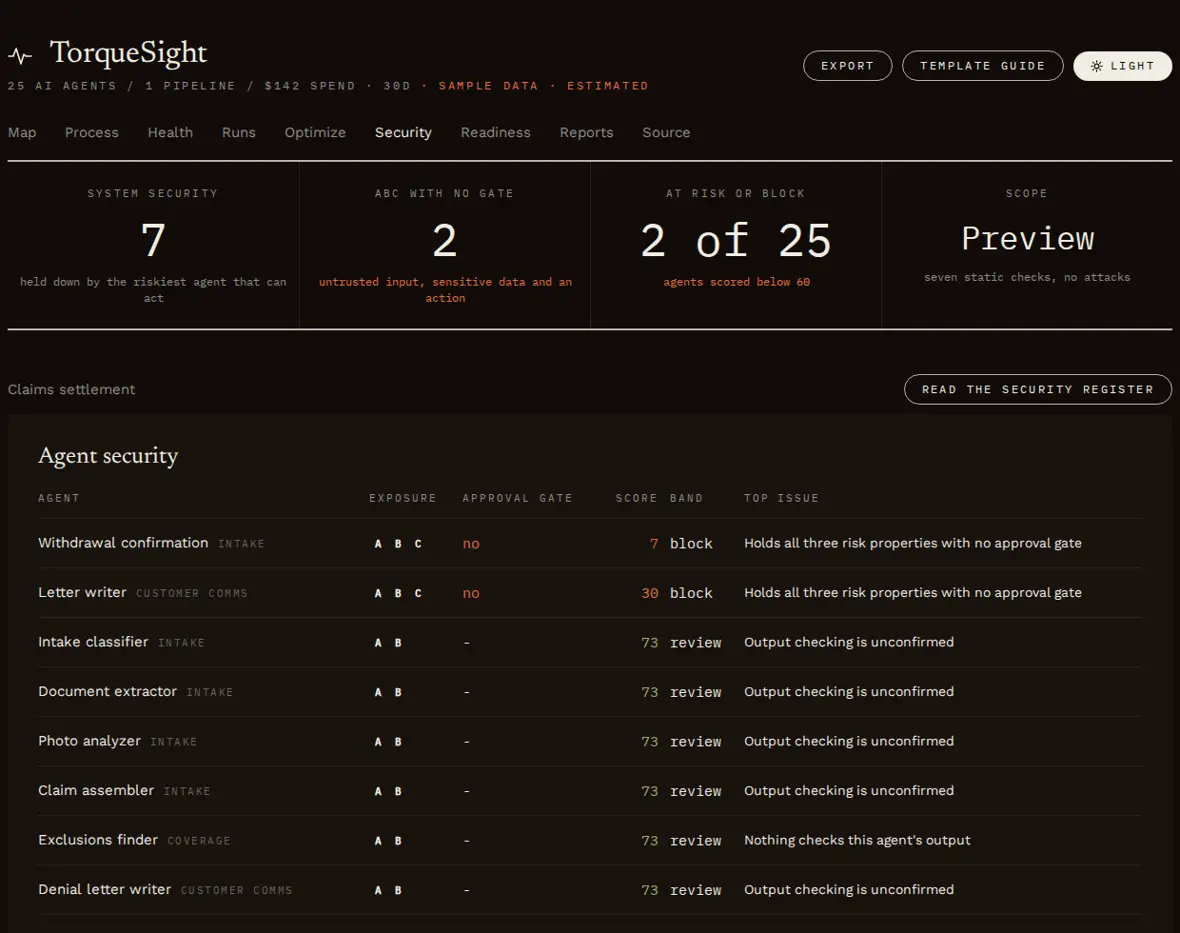
Each agent's exposure to three risk properties: untrusted input, sensitive data and the ability to act. Agents with all three and no human approval rise to the top, each with its fix. Static review only; nothing is attacked.
Open the Security tab in the live demo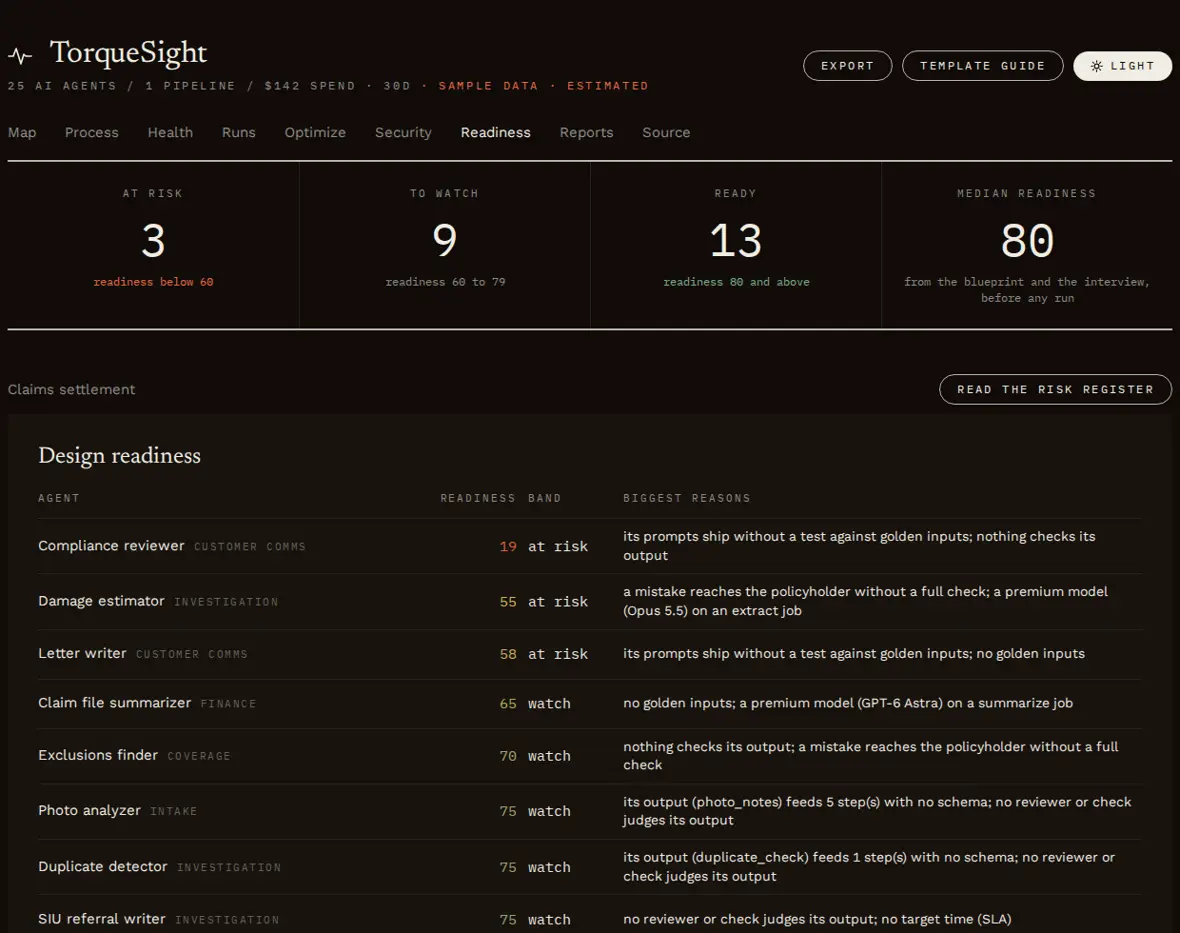
Which agents are likely to struggle, predicted from the design and the interview before any run, so you can fix them before they fail.
Open the Readiness tab in the live demo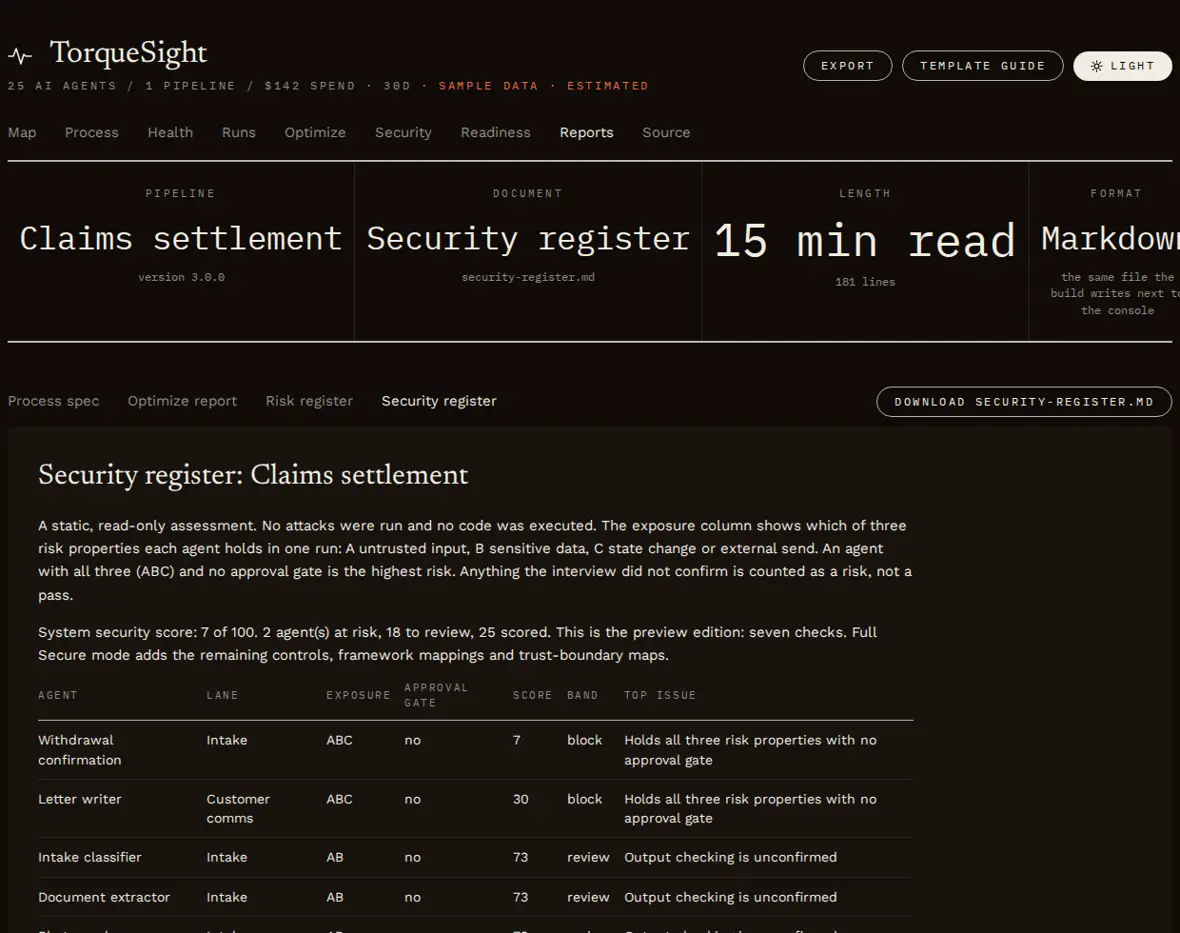
The process spec, the optimize report, the risk register and the security register, rendered and ready to download.
Open the Reports tab in the live demo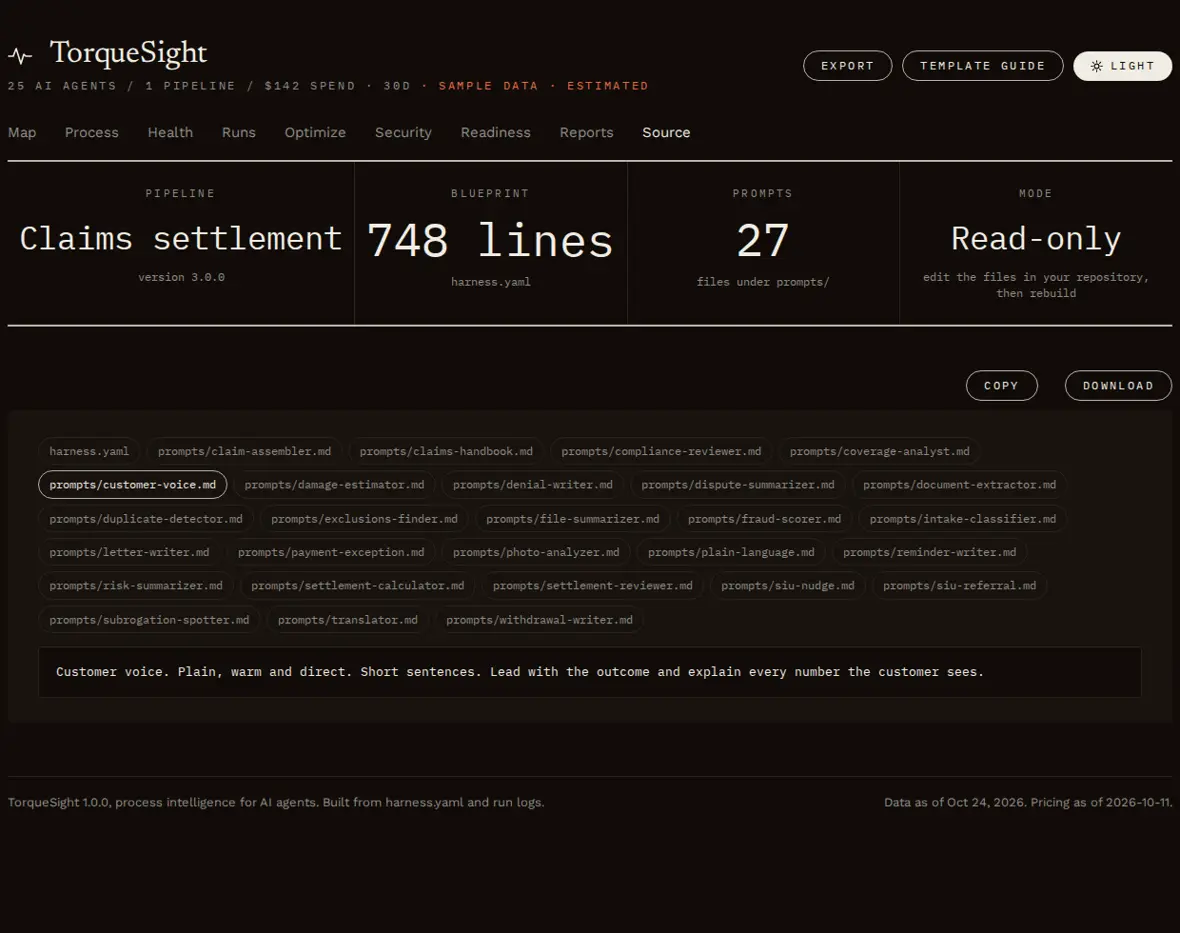
The whole blueprint and each prompt file, read-only, with copy and download, so the console is the one place to see everything.
Open the Source tab in the live demoBPMN (Business Process Model and Notation) is the international standard for drawing a process, published as ISO/IEC 19510. Its shapes are simple and consistent, so a developer, a business owner and an auditor can read the same picture. Here is a small agent process drawn the way TorqueSight draws yours.
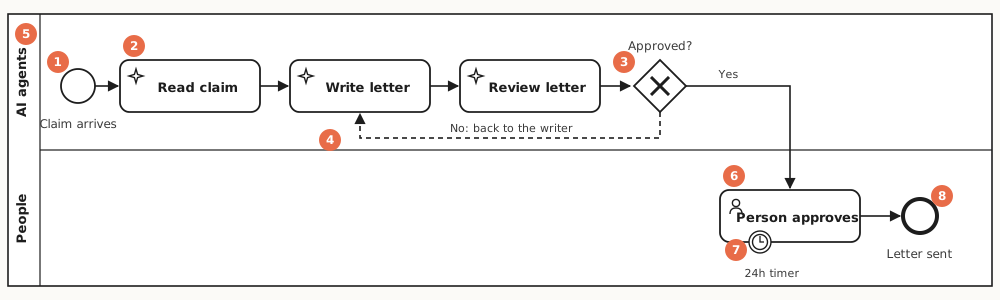
Code shows one developer what happens. A BPMN map shows the whole team, including the people who approve, audit or pay for the work.
Where agents hand off, where people approve, where work loops back, where a timeout fires, and where a mistake can reach a customer.
The same map exports as BPMN 2.0 and opens in bpmn.io or Camunda, so it fits the tools process teams already use.
Steps are colored by health, spend or latency, and As run shows which paths real runs took and how often each loop fired.
Bring your own logs. TorqueSight reads a blueprint and a run log and never connects to your systems. Pick your stack to see exactly how it connects.
No code changes. TorqueSight reads history your platform already keeps.
Send their traces to a collector you run, then import the file.
One file with no dependencies, called from the place every model call passes through.
20 platform guides, each also available as its own page.
Each demo is the real console, a single offline HTML file built from sample data. It opens in a new tab.
A 25-agent claims process with 10 human approvals. The flagship example: the BPMN map, health, cost, ranked fixes, the security review and every report.
Built entirely from an n8n workflow export and its execution history, with no hand-written blueprint. It finds a drafter that got worse after its system message was edited.
One console across claims, support triage, research, marketing content and code review, to see how the viewer handles several pipelines at once.
An open-source skill and toolkit that brings process intelligence to AI agents. It maps your agents as a BPMN process, scores each agent's health and cost from your run logs, ranks the fixes worth making, and reviews whether the agents are safe.
No. It does not run your agents. It sits above whatever already runs them, such as n8n, LangGraph, CrewAI, the OpenAI Agents SDK or the Claude Agent SDK, and reads the history they produce.
Observability tools show what happened inside a single call or trace. TorqueSight shows the whole process across every run: where it breaks, what it costs and what to fix. It can import data from tools such as Langfuse and OpenTelemetry.
No. There is no TorqueSight server, account or telemetry. It runs in your Claude or Codex session and on your machine, reads logs you provide, and its recorder writes metadata only to your own logs.
n8n, OpenTelemetry, Langfuse, LangChain, LangGraph, CrewAI, the OpenAI Agents SDK, the Claude Agent SDK, Google ADK, Strands, Mastra, the Vercel AI SDK, Pydantic AI, LlamaIndex, Amazon Bedrock, Bedrock AgentCore, Azure AI Foundry, Lovable, the Anthropic and OpenAI APIs, and xAI Grok.
Yes. TorqueSight is open source under the Apache-2.0 license. TorqueSight Enterprise, a delivery kit deployed in your own cloud, is coming soon.
One command installs TorqueSight into Claude Code, OpenAI Codex, Cursor and other agents that read skills.
npx skills add ORG/torquesightDownload torquesight.skill from the latest release and add it in your Skills settings. Then ask in plain language.
Latest releaseRun these two commands in Claude Code.
/plugin marketplace add ORG/torquesight
/plugin install torquesight@juggernaut
Copy the torquesight skill folder into .agents/skills/ in your repository, then ask Codex in plain language.
Available now
Design, audit, health, optimize, the risk register, the security preview, the nine-tab viewer, and importers for n8n, OpenTelemetry and Langfuse. Bring your own logs.
Coming soon
A delivery kit deployed in your own cloud that copies logs from CloudWatch, Azure Monitor, Datadog or Splunk on a schedule and hosts the console behind your own sign-in. Your data never leaves your account.
In the future
Hosted dashboards, alerts and history, plus the full visualization and security experience in one place. Opt-in, metadata only.
TorqueSight is open source under Apache-2.0, built by Juggernaut Dev. Works in Claude.ai, Claude Cowork, Claude Code and OpenAI Codex.