Free, open source and private by design. No analytics, no tracking, no accounts. The Architecture Flow Tool runs entirely in your browser, or you can download the single HTML file and keep it.
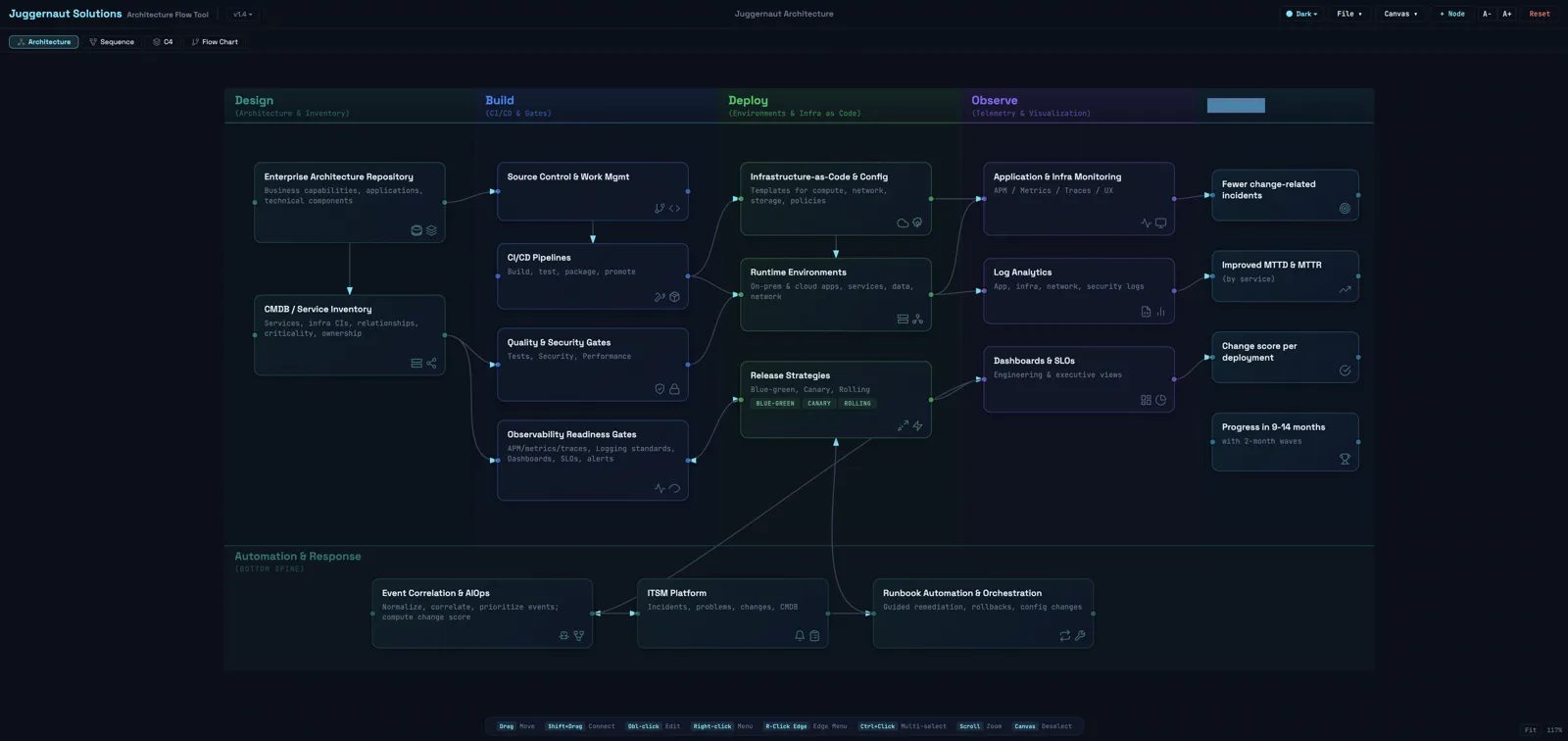
The Architecture view: swim lanes for design, build, deploy and observe, with a bottom spine for automation and response.
4
Diagram types
50+
Templates
45+
Icons
0
Data sent to us
Four diagram types. One tool.
Create architecture, sequence, flow chart and C4 model diagrams, all within a single, zero-install HTML file.
Architecture diagrams
Swim-lane architecture views with nodes, edges, icons, tags and a bottom spine for cross-cutting concerns.
Sequence diagrams
Participants, messages, fragments (alt, opt, loop and ref), notes and self-calls.
Flow charts
Five shape types, labeled edges, port control and conditional branching for process flows.
C4 model views
Context, Container, Component, Dynamic and Deployment views following the C4 standard, with drill-down between views and a step-through Dynamic view.
More diagram types are coming. Request one on the feature board.
Private by design. Not by promise.
No telemetry, no accounts, and your diagrams never leave your browser. Open your browser's developer tools and check it yourself.
No analytics or tracking
No telemetry, no cookies, no fingerprinting and no usage data collected.
Local storage only
Every diagram is saved in your browser's local storage, on your machine.
Nothing sent to a backend
The diagrams you draw are never uploaded to a server.
Download and keep it
Download the single HTML file and run it from your desktop, with no server and no account.
Free during beta
Templates and AI generation
Browse a growing library of architecture templates, with new ones added weekly: CI/CD pipelines, microservices, event-driven systems, zero-trust security, AI and ML platforms, and more. Or describe what you need in plain English and let the AI generator build the diagram JSON for you.
Describe an architecture in plain English and get a downloadable JSON template in seconds. Supports architecture, sequence, flow chart and C4 diagram types.
Pre-LLM content safety
Security before AI, not after
Every AI prompt is screened by a content safety filter before it ever reaches the model, first in your browser and again on the server as a safety net. Prompts are never stored.
PII detection
Social Security numbers, card numbers, phone numbers, email addresses, dates of birth and contextual patterns such as "my SSN is" are blocked instantly.
Secrets and credentials
AWS keys, GitHub tokens, JWTs, private key blocks, database URIs, Stripe keys and API key assignments are caught and rejected.
NERC CIP and critical infrastructure
SCADA protocols, relay models, BES Cyber System terms and substation identifiers are scored, and aggregated matches are blocked.
Harmful and abusive content
Hate speech (with leetspeak normalization), violence, threats and prohibited content are filtered before the prompt is sent.
Two-layer defense
Checks in your browser block a prompt before any network call. The server repeats the check as a safety net for direct API access.
Prompts never stored
Prompts are processed in memory and discarded. Only success and failure counts are logged, never what you typed.
IP and network data
Private IP addresses, IPv6, CIDR notation and MAC addresses are detected and blocked before reaching any external service.
Enterprise ready
Need private AI, single sign-on, or help deploying across your organization? Juggernaut Dev can enable the full platform for your team, with dedicated support, integration help and custom hosting options.
Hand-author diagram JSON for full control, generate it with AI for speed, or drag and drop on the visual canvas. The JSON schema is documented, so you can use it in your own tooling, CI pipelines and documentation workflows.
The Architecture Flow Tool is a single self-contained HTML file. Open it in any modern browser: there is no build step, no install and no account. When you import JSON without coordinates, it lays the diagram out for you, grouping nodes into swim lanes and pushing apart anything that overlaps.
Part
How it works
Runtime
React 18, with JSX compiled in the browser
Styling
Inline styles driven by one theme object, so switching themes is instant
Icons
45+ custom SVG icons, Lucide-compatible, grouped by category
Connections
SVG Bezier curves that pick the closest anchor points between nodes
Layout
Automatic swim lanes and overlap resolution for imported diagrams
Storage
Your browser's local storage, saved on every change
Themes
Dark, light, Nord, Midnight Purple and more
Getting around the canvas
Drag MoveShift + drag ConnectDouble-click EditRight-click MenuRight-click an edge Edge menuCtrl + click Multi-selectScroll ZoomClick the canvas Deselect
Understand and extend the tool
The developer portal includes ARCHITECTURE.md, a standalone Markdown guide to the tool's internal architecture for developers and AI coding assistants.
Tech stack, code structure and state management patterns
Adding icons, themes, diagram types and node fields